|
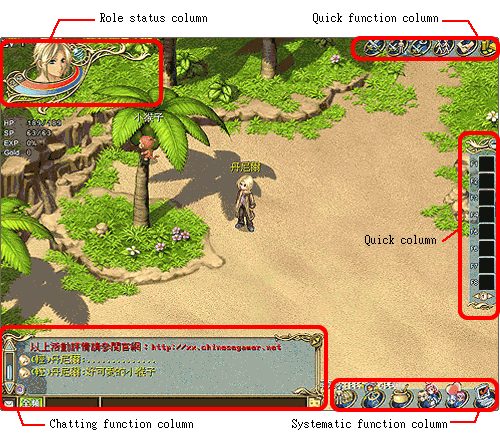
There are five function in the interface, includes
role status column, quick function column, quick
column, chatting function column, and systematic
function column.
1.Role status
column:
Player's information will be shown in the topside
of the left. Player's picture, level (Lv), experience
value (EXP) and money (Gold) will be shown on it.
The ball shows player's attribute. Red represents
for HP and blue represents for SP. The information
of the following NPC will be shown.
2.Quick function
column:
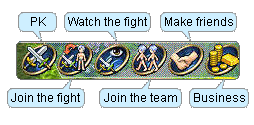
There are lists of columns on the topside of the
right, includes PK, join the fight, watch the fight,
make friends, and business.
PK:
You can PK and challenge players.
Join the fight:
You can join the fight of other players.
Watch the fight:
You can watch the fight of other players.
Join the team:
You can make a team with other player and go together.
Make friends:
You can make friend with other player.
Business:
You can open the function of money trading, includes
selling and buying items, pets, tools and also throwing
money.
3.Quick column:
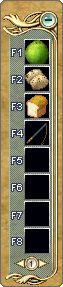
There are five forms in the downside of right; player
can use these forms to store your items. When you
are fighting, player can use the special skill in
quick column and choose your enemy.
4.Chatting
function column:
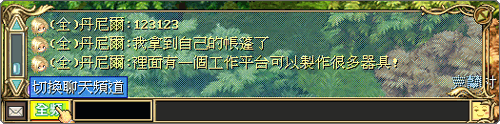
There is a long column in the downside; player can
input the conversation sentence. For the left column,
you can choose the person you want to talk to. For
the right column, you can choose some symbols to
color your conversation.
Light channel:Only
Players in the same scene can see this
Private channel:Only
player and private channel person can see this
Team channel:Team member
can exchange message with each other.
Organization channel:Channel
connect the whole organization
Full channel:All players
can see this
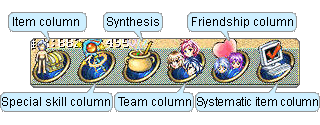
5.Systematic
function column:
Systematic function is on the downside of the right.
There are six functions, includes items, special
skills, synthesis, team organization, friendship
and systematic column.
Item column:
Player can adjust the equipments and items for yourself
and your NPC.
Special skill column:
Player can see the learning skills, attributes,
attacking ways ,familiarity and consider which weapon
suits.
Synthesis:
Player can use the melt synthesis. Just click items
more than one and put them into the melt stove then
synthesis begins.
Team column:
Player can open this column and decide to let your
NPC fight, ride or take a rest. Here player can
also check the status of teams with other players.
Friendship column:
Player can check the status, nickname, organization
of their friends. Also player can send e-mail for
them. You can set up the emotional symbols and actions
in quick column for the conversation in the future.
Systematic item column:
Player can open or close the channel of PK, friendship,
music, sound effects , channel color and character
information. There are also many buttons for players,
includes the official website connection, change
password, on-line description, return to rebirth
place, the billing function, check the points, sign
out the game and leave this game.
|
 |
|
|
|
|